

It usually starts with a simple thought: ‘I should probably register for NEET soon.’ Minutes later, you are staring at the application portal, unsure what to fill in first. If that sounds familiar, this guide is for you. Here is a clear, practical breakdown of the NEET (UG) 2026 registration process and the documents you need.
Official NEET 2026 Registration Window and Key Details
1. Registration Schedule for NEET (UG) 2026
- Online application form submission: 08 February, 2026 to 08 March, 2026 (up to 9:00 p.m.)
- NEET application form 2026 last date for successful fee transaction: 08 March, 2026 (up to 11:50 p.m.)
- Correction window: 10 March to 12 March, 2026
- City intimation slip: To be announced later
- Admit card download: To be announced later
- Exam date: 03 May, 2026
- Exam timing: 2:00 p.m. to 5:00 p.m. (3 hours)
2. Official Websites for Registration
You can apply only online through https://neet.nta.nic.in and https://nta.ac.in.
3. Mandatory Nature of Online Application
How to apply for NEET 2026? Worry not, the entire application process is online, right from NEET 2026 registration, uploading documents, fee payment, confirmation page generation to admit cards.
Note: No document should be sent by post/email/WhatsApp/by hand. Offline forms are rejected.
4. Application Form Rules
- Application once submitted cannot be withdrawn
- Incomplete/incorrect applications may be rejected
- Multiple applications lead to cancellation of candidature
- Information entered is treated as final after fee payment
- Only limited edits allowed during correction window
5. Aadhaar and Identity Requirements
You are strongly advised to use Aadhaar to avoid extra verification. Aadhaar must be updated with name, date of birth, gender, photograph, address, and Biometrics.
UIDAI website for updates: https://uidai.gov.in. For non-Aadhaar applicants, extra identity documents are required.
6. Qualification Codes During Registration
While filling your NEET (UG) 2026 application form, you must select the correct qualification code based on your academic status:
- If you are appearing for Class 12 in 2026: Code 01
- If you have already passed Class 12: Codes 02–07
Comment below, and we’ll break down the NEET 2026 qualification codes in the simplest way possible.
7. Examination City Selection
- You can choose 3 cities
- Computer-based allocation
- No human intervention
- No changes after admit card
8. Application Fee Structure In India
| General | General-EWS/OBC-NCL | SC/ST/PwD/Third Gender | Outside India |
| ₹1700 | ₹1600 | ₹1000 | ₹9500 |
Payment modes:
- Net banking
- Credit card
- Debit card
- UPI
Processing charges extra.
NEET (UG) 2026 Step-By-Step Application Form Process
How to fill NEET application form 2026? The step by step NEET 2026 registration process includes the following:
Step 1: Create or log in to your registration account to start the application.
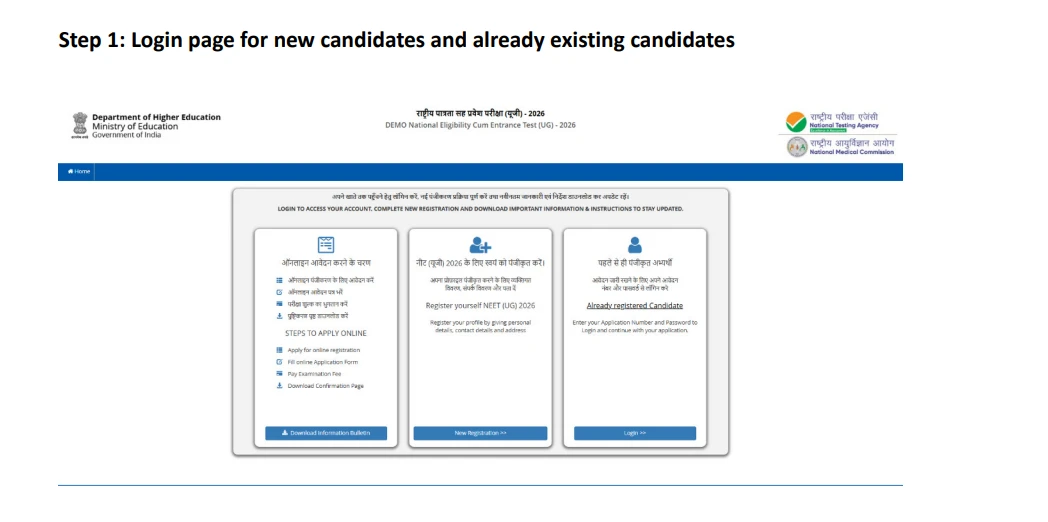
Login Page NEET Registration 2026
Step 2: Read the instructions carefully and give your consent.
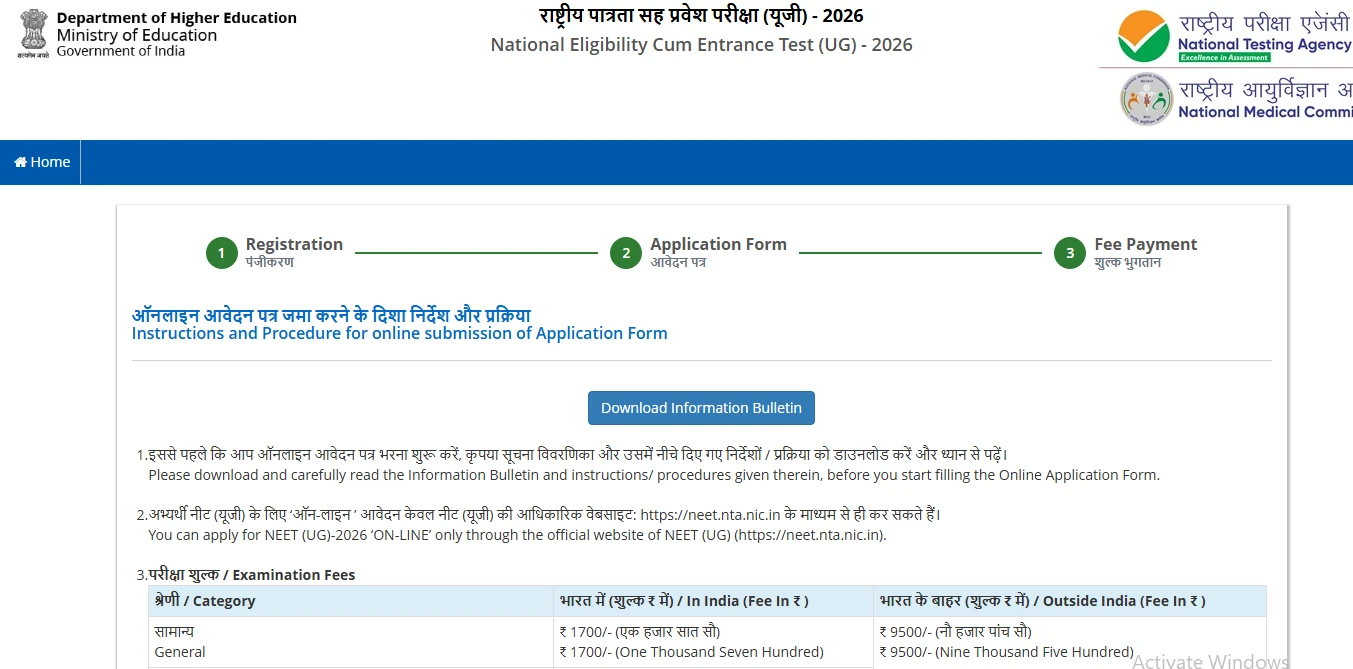
Instructions for NEET Registration 2026
Step 3: Enter your personal information for NEET registration like name, date of birth, and gender.
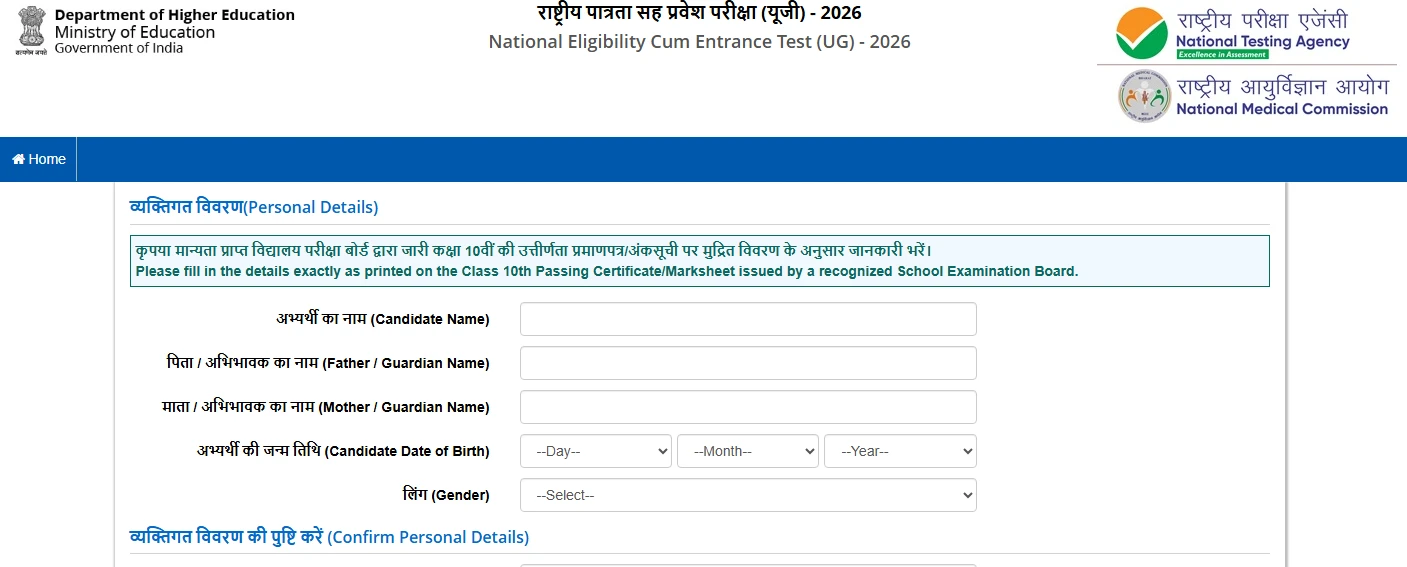
NEET registration 2026 application form
Step 4: Review page of NEET online registration form
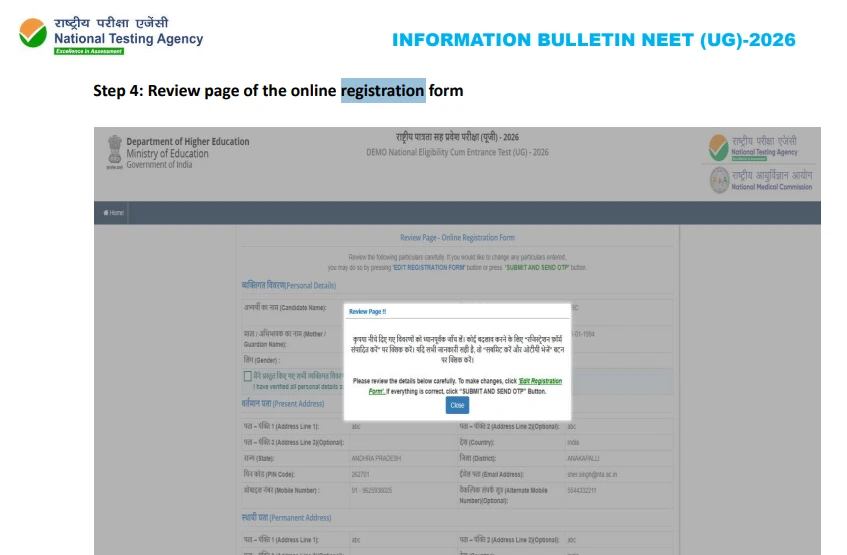
Review page of NEET online registration form
Step 5: Verify your mobile number using an OTP sent via SMS.
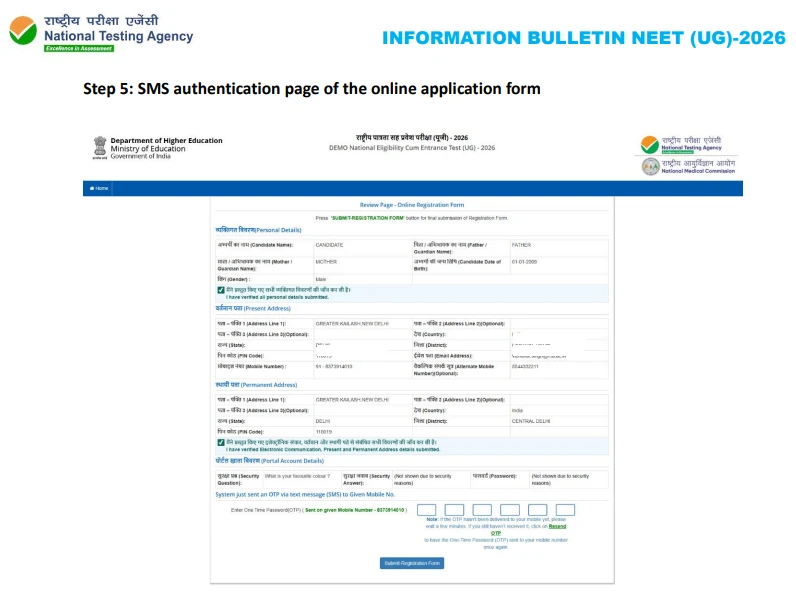
SMS Authentication for NEET online registration form
Step 6: Set your password and security details for future login.
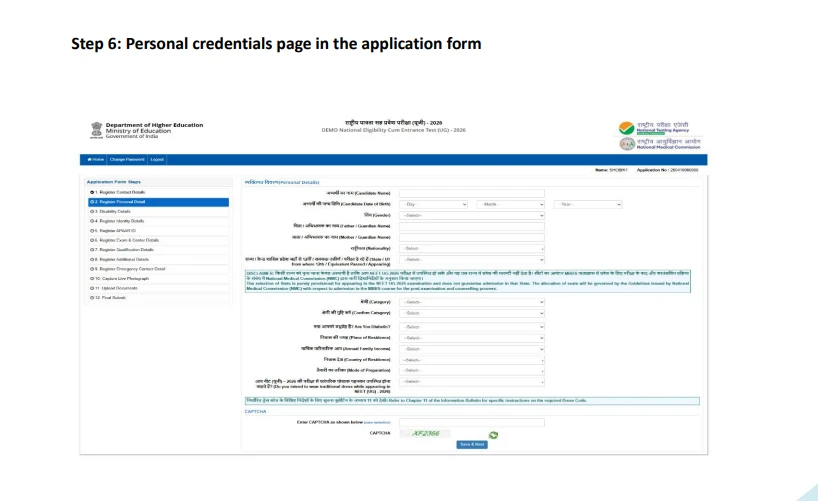
Personal credentials page in NEET application form 2026
Step 7: Provide information if you have any disability and need exam support.
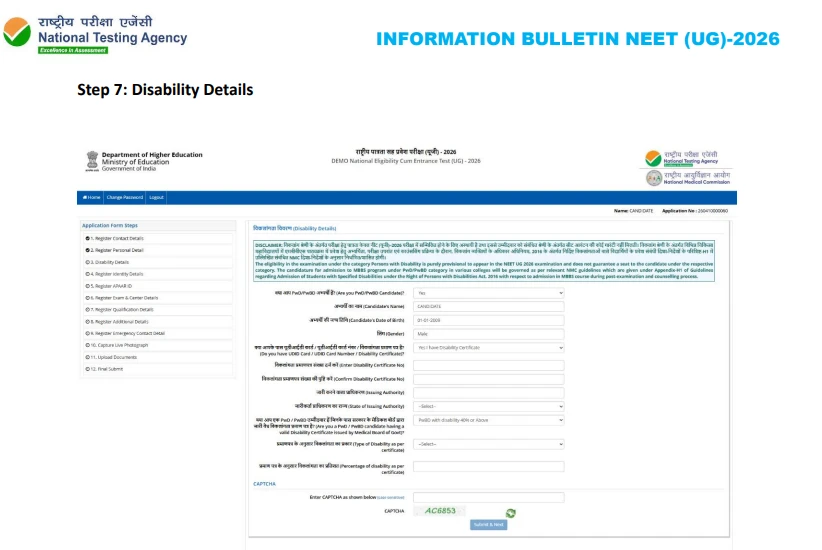
Disability Details in NEET application form 2026
Step 8: Confirm your identity using Aadhaar or another valid ID.
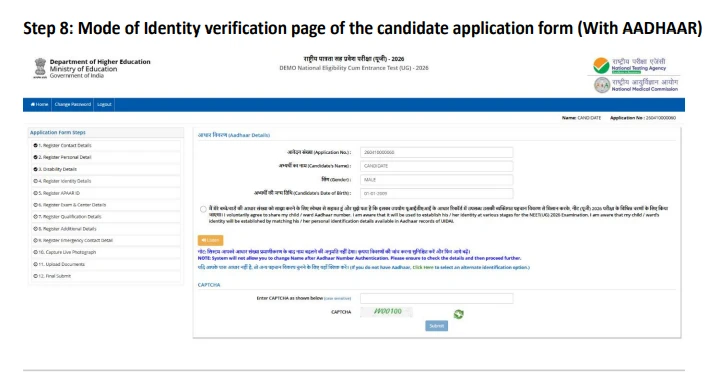
Mode of Identity in NEET online registration form
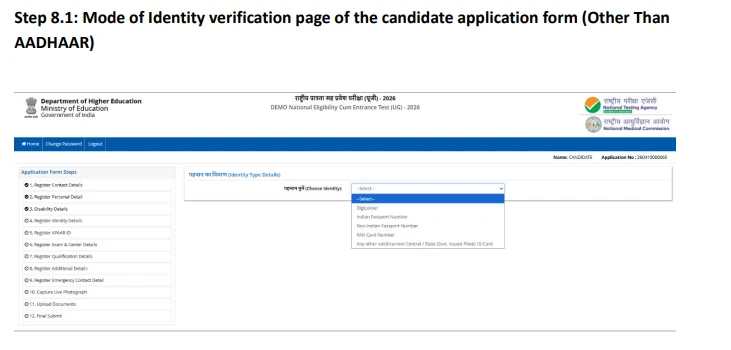
Mode of Identity 2 in NEET online registration form
Step 9: Entering APAAR ID in NEET 2026 registration.
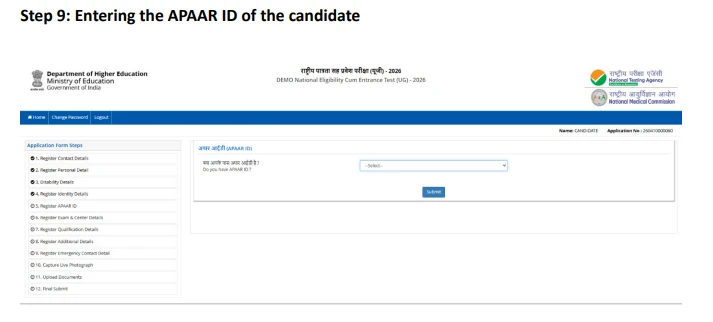
APAAR ID in NEET application form 2026
Step 10: Choose options in exam centre, medium of question paper, etc.
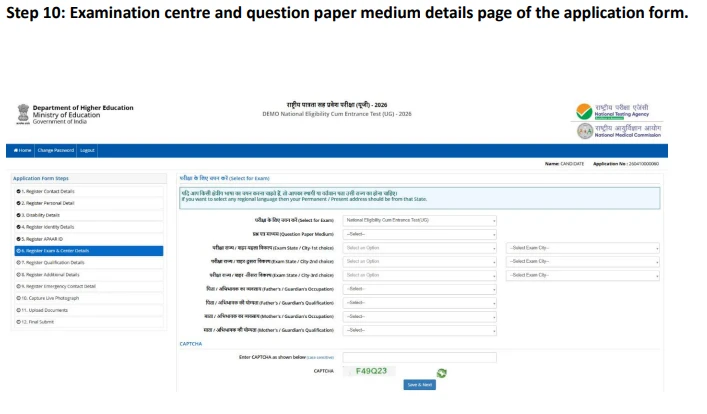
Exam centre and question paper medium in NEET application form 2026
Step 11: Provide extra required information such as qualifications.
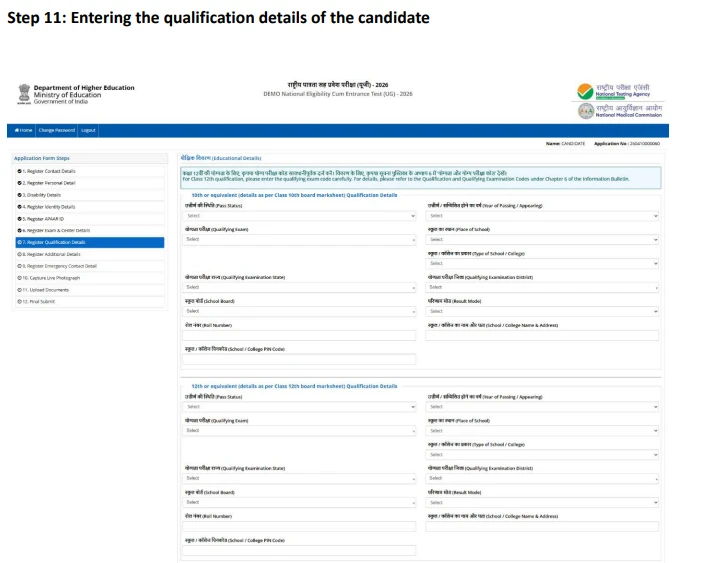
Qualification Details in NEET application form 2026
Step 12: Fill in some additional details about the previous NEET (UG) exams.
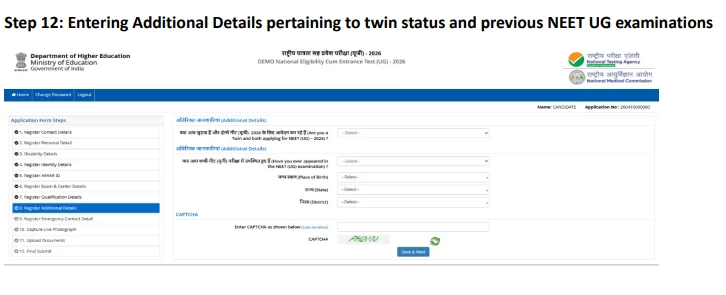
Additional Details in NEET application form 2026
Step 13: Add contact details of a person to reach in emergencies.
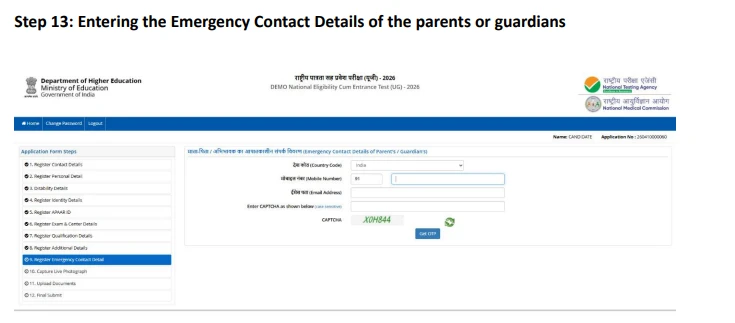
Emergency contact details in NEET application form 2026
Step 14: Take and upload a live photo as per guidelines.
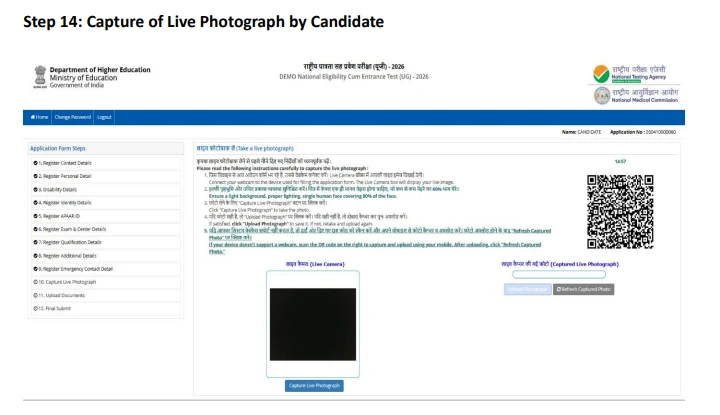
Upload a live photo in NEET 2026 application form
Step 15: Upload required documents like signature and certificates.
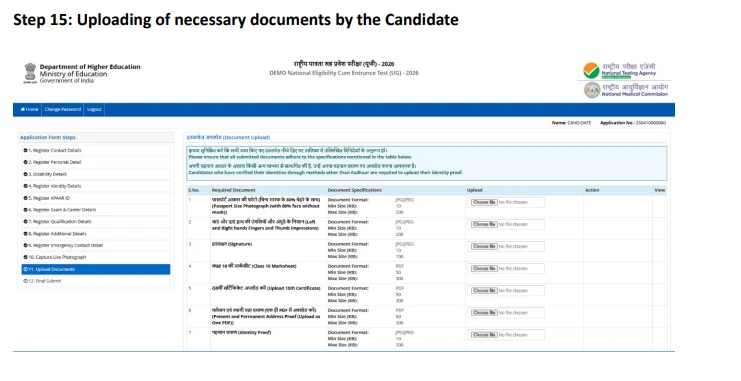
Upload required documents in NEET 2026 application form
Step 16: Recheck the complete form before submitting it.
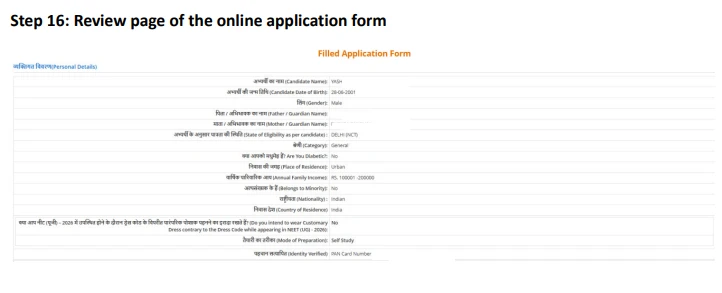
Review page of online application form
Step 17: Verify your email address through an OTP or confirmation link.
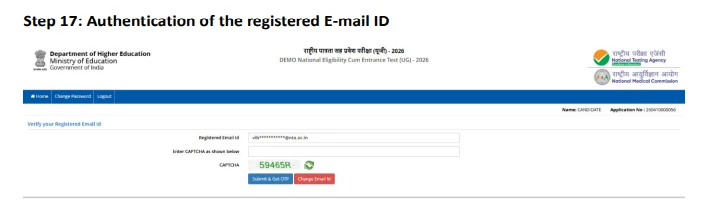
Authentication using OTP for NEET registration 2026
Step 18: Pay the application fee to complete your registration.
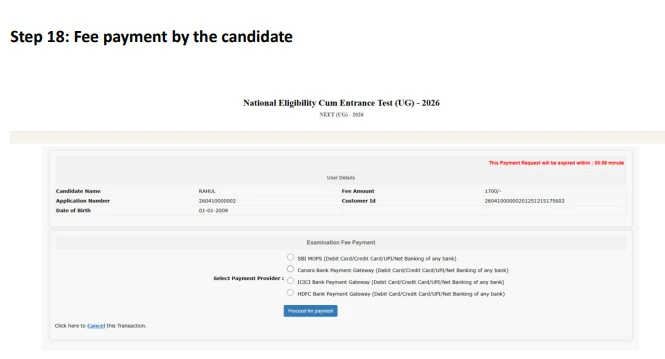
Application fee for NEET registration 2026
Step 19: Confirmation page for the NEET 2026 application form.
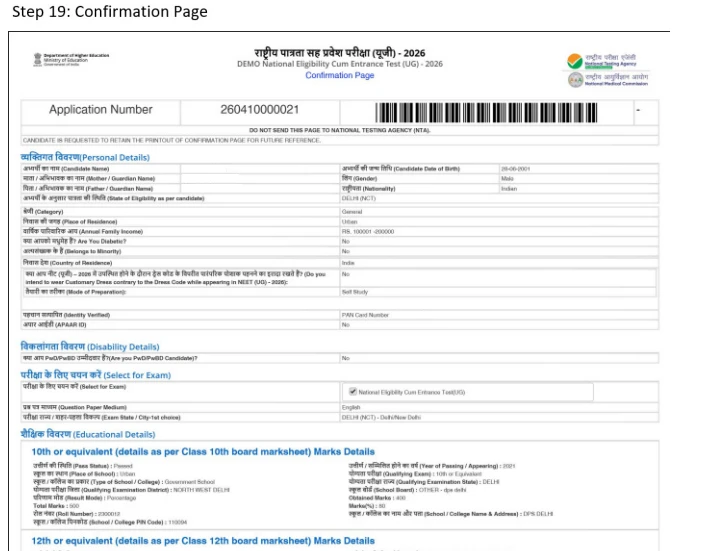
Confirmation page for NEET 2026 registration form
NEET (UG) 2026 Application Form Required Documents to Upload
Before you move ahead with NTA NEET registration 2026, take a moment to focus on the document upload step mentioned in the process above. It may seem simple, but it plays a crucial role in your application. The documents you submit are carefully reviewed by the National Testing Agency to confirm your eligibility and approve you to appear for the exam. That is why it is essential to read the instructions thoroughly and upload every document with care.
Since you are reading this blog before uploading your documents required for NEET 2026 registration, you already have an advantage. You can double-check the required documents, follow the correct format, and avoid common mistakes that could delay or affect your NEET 2026 application form.
Now, let’s get started.
1. Photograph
First and foremost, you need a recent passport-size (2×2 inch) and postcard-size (4×6 inch) photograph taken after 01 January, 2026. The photo should show 80% of your face with ears visible, against a white background, without masks, caps, or goggles. Regular spectacles are allowed.
Now, how to upload photo in NEET form? Upload the images in JPG/JPEG format (10 KB to 200 KB) and name the file using the first two letters of your name followed by '_PHOTO'. Keep multiple printed copies of the same photo for exam and counselling use.
2. Signature and fingerprint impressions
Upload your full running signature written in black ink on white paper. It should be scanned clearly in JPG/JPEG format (10 KB to 50 KB) and named using your initials followed by '_SIGNATURE'.
You also need to upload scanned impressions of your fingers and NEET thumb impression format in JPG/JPEG (10 KB to 200 KB), saved as '_FINGERPRINT'.
3. Identity proof
You also require an ID proof for NEET. Which is why, you must upload one valid identity document based on your nationality, such as Aadhaar, passport, or other government-issued ID. The scanned NEET ID proof copy should be in JPG/JPEG format (10 KB to 200 KB) and named using your initials plus the last four digits of your ID number.
4. Class 10 marksheet and certificate
Upload scanned copies of your Class 10 marksheet and passing certificate in PDF format (50 KB to 300 KB). Name them clearly using your initials with '_CLASSXCERTIFICATE' and '_CLASSXMARKSHEET'.
5. Address proof
Upload your present or permanent address proof in PDF format (50 KB to 300 KB), named using your initials followed by '_ADDRESSPROOF'.
6. Category certificate (if applicable)
If you are claiming reservation benefits, upload your category certificate in PDF format (50 KB to 300 KB), named with your initials followed by '_CATEGORY'.
7. Citizenship proof (if applicable)
NRI, OCI, or foreign candidates must upload citizenship-related documents in PDF format (50 KB to 300 KB), saved as '_CITIZENSHIPPROOF'.
8. PwD/PwBD/UDID certificate (if applicable)
Candidates applying under PwD/PwBD must upload the required medical certificates in a single PDF (50 KB to 300 KB). If you are opting for a scribe, you also need to upload the scribe’s photograph, signature, qualification certificate, undertaking, and identity proof in the prescribed formats.
NEET 2026 form filling instructions to avoid application form rejection:
Before you upload anything, double-check these essential points:
- Your photograph and signature must be clear and not blurred. Unclear uploads can lead to direct rejection.
- Do not upload anyone else’s documents or edited images. This is treated as unfair practice.
- False information for reservation benefits can cancel your admission.
- You do not need to send any physical documents to NTA.
- Polaroid or computer-generated photos are not accepted.
- You can use DigiLocker and UMANG to securely access and validate your documents.
To Sum it Up
In short, NEET form 2026 is less about rushing through the form and more about doing each step carefully. If you understand the process, keep your documents ready in the correct format, and double-check your details before submission, the entire experience becomes much smoother. The National Testing Agency portal and the registration process 2026 may look overwhelming at first, but once you follow it step by step, it is completely manageable. Take your time, stay organised, and treat this NEET (UG) 2026 registration as your first serious step toward your medical journey.
Helpline
Helpline numbers:
011-40759000
011-69227700
Email: